
 Ojixa
Ojixa
Shopify, BigCommerce, custom, headless: how to actually choose in 2026
How to choose between Shopify, BigCommerce, custom, and headless commerce in 2026: a decision framework covering pricing, platform fit, and what most comparisons get wrong.
Choosing between Shopify, BigCommerce, and custom looks easy at first; it isn’t. The decision compounds for years, and replatforming a live store is one of the more expensive corrections in software. I’ve led the kind of migration that proves it.
What makes the decision harder in 2026 is that most comparison content oversimplifies the picture. The “Shopify for small stores, BigCommerce for complex catalogs” framing that still dominates search results captures some real technical differences but misses how much both platforms have evolved. The decision in 2026 is rarely about whether the platform can handle your store. It’s about which platform fits your specific situation: ecosystem fit, team readiness, cost at your specific scale, and whether you should use the platform’s frontend or build your own on top of it.
Here’s the framework I actually use when helping teams work through this decision.
The three platform options in 2026
Most stores could be built on either Shopify or BigCommerce adequately. The real question is which platform fits your team, your scale, your feature priorities, and where your business is heading.
Shopify has invested heavily in unlocking custom logic directly inside the platform. Shopify Functions lets developers write custom validation, discounts, shipping rules, and payment logic that runs natively on Shopify’s infrastructure, without operating separate servers. The platform ships changes frequently, with major releases every quarter and smaller updates almost weekly.
BigCommerce takes a different approach. The checkout is open source, so teams can fork and customize it directly. API contracts are stable for long periods, which matters for teams planning multi-year roadmaps without rewriting integrations. BigCommerce moves more slowly than Shopify, but the things you build on it tend to keep working without rework.
Custom is the third option, chosen in far fewer cases than people assume. Most “we need custom” conversations are actually about extending a platform with one of the two patterns below.
Three architectural patterns when the platform doesn’t cover everything
When the platform doesn’t cover something out of the box, the first move isn’t to build. It’s to check the app store. Most gaps a business hits have already been solved by an existing app or extension: installed in minutes, a monthly fee, no infrastructure to run. Building only earns its place once you’ve confirmed nothing off-the-shelf fits, or the fit is poor enough to justify owning and maintaining the alternative.
When you do need to build, there are three main patterns. They’re often discussed together but they’re fundamentally different.
Integration server (additive). Add a separate server alongside the platform that handles specific functionality the platform doesn’t provide natively. The platform continues to handle everything it normally handles; the integration server adds capability that didn’t exist before. Examples include a subscription management service called from the standard checkout, a custom pricing engine, or a fulfillment orchestration layer.
Headless frontend (substitutive, light). Replace the platform’s presentation layer with a custom frontend, while keeping the platform’s commerce backend. The platform handles catalog, cart, checkout, and payments through its APIs; the custom frontend reads from those APIs directly and renders everything users see. You operate one layer of custom infrastructure: the frontend itself.
Composable commerce (substitutive, full). Add a custom backend layer between your frontend and the platform. Your backend becomes the canonical commerce service for the business, calling the platform’s APIs upstream and serving your frontend (and other systems) downstream. The platform becomes one component in a larger commerce stack alongside ERP, OMS, PIM, search, personalization, and other systems. This is the pattern enterprises typically adopt when commerce sits within a complex operational environment. You operate two layers of custom infrastructure with their own scalability characteristics.
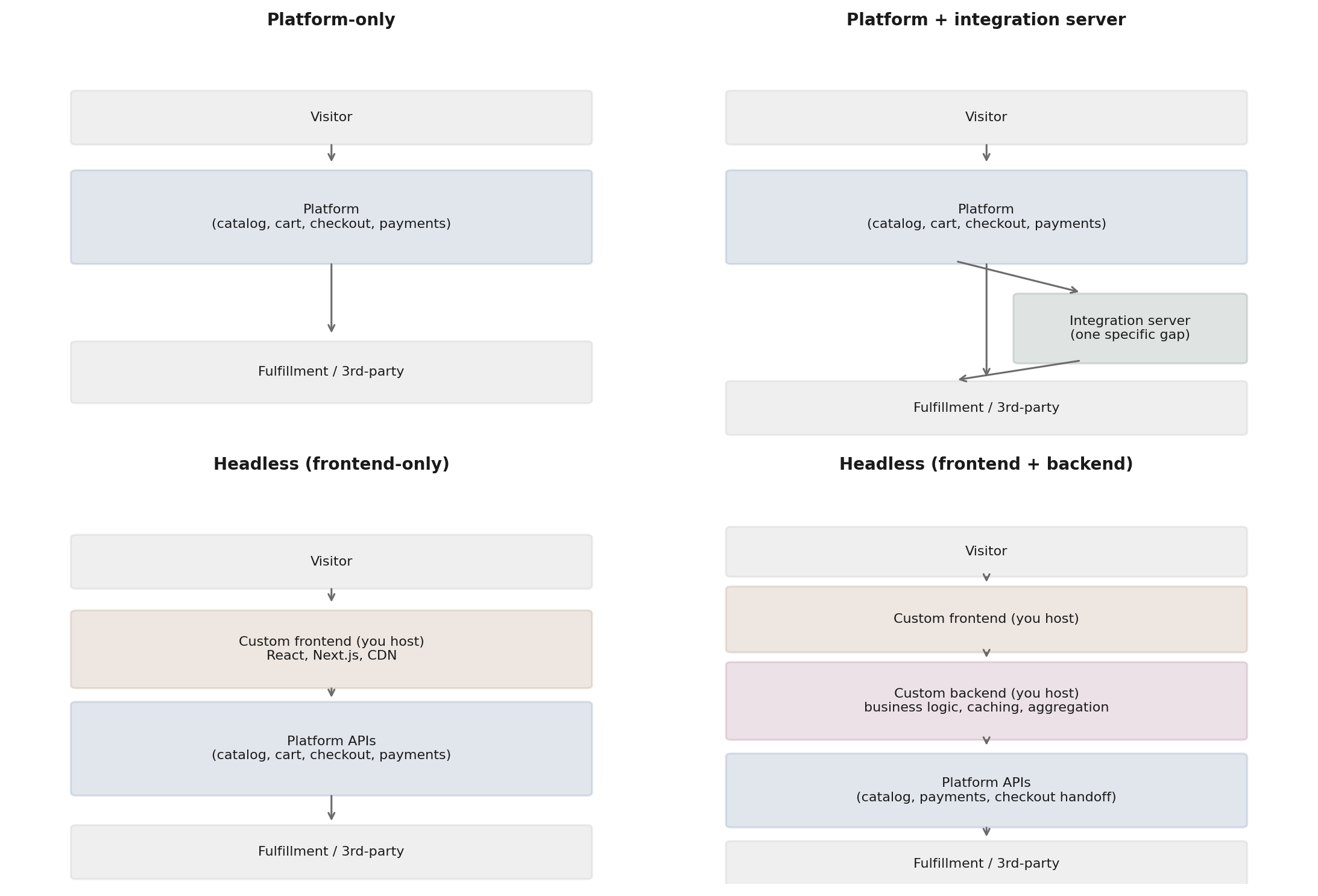 Four architectural patterns: platform-only, platform + integration server, headless (frontend-only), and composable commerce (frontend + backend).
The three patterns sit on a spectrum: cost, complexity, and operational burden all increase as you move from an integration server to a headless frontend to composable commerce, but so does the ability to do things the platform can’t.
Integration servers add capability alongside the platform. Headless frontends replace the presentation layer. Composable commerce treats the platform as one component in a custom-built stack.
Before choosing any of these patterns, the team needs to be honest about whether they’re ready to operate infrastructure long-term. All three shift operational burden from the platform to you: hosting, monitoring, security patching, scaling, on-call rotation, engineering time. Teams that aren’t ready often start with one of these patterns and then can’t maintain it. What started as “we want more flexibility” turns into “we can’t afford to keep this running, but we can’t easily go back either.”
Entry pricing and what’s gated behind it
At entry tier, US pricing is identical: both platforms charge $39/month standard or $29/month billed annually. The difference isn’t price; it’s what’s gated behind it. Shopify Basic lets you stay on the plan as you grow (no revenue cap) but charges 2% on non-Shopify-Payments transactions and gates customer groups, persistent cart, and several other features behind higher tiers. BigCommerce Core includes more out of the box at this price but caps you at $30K trailing 12-month GMV before auto-upgrading to Growth at $105/month. Below $30K annual revenue, either platform works at the same price. Above that, BigCommerce forces an upgrade while Shopify Basic continues. Pricing varies by region; check the platform’s pricing page for your specific country.
When Shopify is the right call
Shopify’s biggest shift in the last two years is what you can now do without ever leaving the platform. Shopify Functions changed what’s possible. Custom validation, discounts, shipping logic, and payment routing all run natively on Shopify’s infrastructure. Teams that previously would have needed integration servers for this logic can now do it inside the platform.
Beyond Functions, Shopify wins when:
Ecosystem depth matters. Shopify’s app store, developer community, and theme marketplace are larger than BigCommerce’s. Hiring is easier because more developers know Shopify. Most third-party services prioritize Shopify integration.
Time to market matters and your team knows Shopify. Shopify’s standard theme system, configuration UI, and the breadth of pre-built themes get you to a live store quickly. BigCommerce’s Cornerstone theme is comparable, so the real differentiator at this level is which platform your team already knows. Time to market favors whichever platform your developers can work in without ramp-up time.
Platform momentum matters. Shopify ships changes frequently. The capabilities you’d be building on are expanding rapidly.
I’ve also seen teams replatform to Shopify after extensive evaluation, choosing it specifically because the ecosystem depth and platform momentum reduced engineering risk on their roadmap. When the requirements fit what Shopify does well, the platform’s maturity and the breadth of pre-built solutions genuinely shorten time-to-value.
Honest caveats
The platform fee is meaningful at scale. Shopify Plus starts around $2,300/month on a 3-year term and transitions to revenue-based pricing at higher GMV levels, with the threshold and specific rates negotiated per contract. Customization beyond Shopify Functions still has limits, and the checkout in particular is more constrained than BigCommerce’s.
The pace of change cuts both ways. New features arrive constantly, but so do deprecations and behavior changes. The nuance worth knowing: you’re not forced to adopt new releases immediately. Stable API versions remain supported for at least a year after release, and when a new version ships, the previous one stays live in parallel for nine more months minimum. The catch is that eventually older versions get deprecated, and migration becomes mandatory. Plan for periodic migration cycles, not constant ones.
When BigCommerce is the right call
BigCommerce’s differentiator isn’t a feature. It’s the willingness to let you fork the checkout. The checkout is open source, so teams can fork it and customize styling, validation, and flow directly in ways Shopify’s checkout doesn’t permit.
Beyond that, BigCommerce wins when:
API stability matters for the roadmap. BigCommerce’s API contracts are stable for long periods. Integrations you build tend to keep working without modification across years, including through engineering team transitions.
On one engagement, the BigCommerce integration code we wrote before 2020 was still running unchanged years later, including through multiple engineering team transitions. The only ongoing work required was keeping packages updated and ensuring no functionality had been deprecated. That kind of stability has a dollar value most teams don’t price in until they’ve gone through the alternative of platforms that force regular integration rewrites.
Roadmap alignment matters for larger stores. A platform that diverges from your business direction over the next 2-3 years creates risk that current feature parity doesn’t capture. BigCommerce’s slower pace cuts both ways. Less new capability arrives, but also less risk of the direction shifting away from what you’ve built on.
Payment processor flexibility on the right plan. BigCommerce’s transaction fee structure changed in June 2026. Self-serve plans now charge an Open Payment Provider Fee of 0.6% to 2% on orders processed through non-embedded payment providers. Stripe, PayPal/Braintree, Adyen, and Checkout.com are exempt as Embedded Payment Providers. The Performance plan (formerly Enterprise) under contracted terms remains exempt entirely. For stores using one of the embedded providers, BigCommerce still has no platform transaction fees, which compounds with volume at high revenue levels. The historical “no transaction fees on any gateway” advantage is narrower now, but the cost advantage still exists for stores using approved providers or operating on Performance contracts.
B2B requirements with specific complexity. BigCommerce B2B Edition has been mature for longer and remains strong for stores with complex buyer hierarchies, custom price lists per customer, and quote-to-order workflows out of the box. Shopify B2B has expanded significantly since 2022 (expanded beyond Plus in April 2026) and now handles most mid-market wholesale workflows natively, though advanced workflows like multi-level approval chains still require customization. Both platforms have meaningful B2B capabilities in 2026; the specific gaps differ rather than one being uniformly more mature.
Complex product variants in specific shapes. Shopify supports up to 3 options per product (for example Size, Color, Material) with up to 2,048 variants per product as of the 2025 platform update. BigCommerce supports up to 250 options per product, which matters specifically for stores that need more than three option dimensions (for example a jewelry item with Size, Color, Material, Length, and Engraving). For the common case where the catalog needs many variants within three option types, both platforms handle it.
Multi-storefront at lower price points. BigCommerce offers multi-storefront capability on lower-tier plans, including standard plans. Shopify multi-storefront requires Plus, which includes 10 storefronts, plus Shopify Markets for multi-region from a single store. The gap is mainly about price point rather than fundamental capability. If you need multi-storefront at lower revenue tiers, BigCommerce is more accessible. At enterprise tier, both platforms handle this well.
Honest caveats
The ecosystem is smaller. Fewer apps, themes, and developers in the hiring pool. You’ll occasionally need to build things that Shopify users would solve with an app. The pace of platform updates is slower; stability is a feature when planning long-term, but it means waiting longer for new capabilities. BigCommerce also doesn’t have a Shopify Functions equivalent for running custom logic on their infrastructure. If you need custom commerce logic without operating your own servers, Shopify’s pattern is more developed.
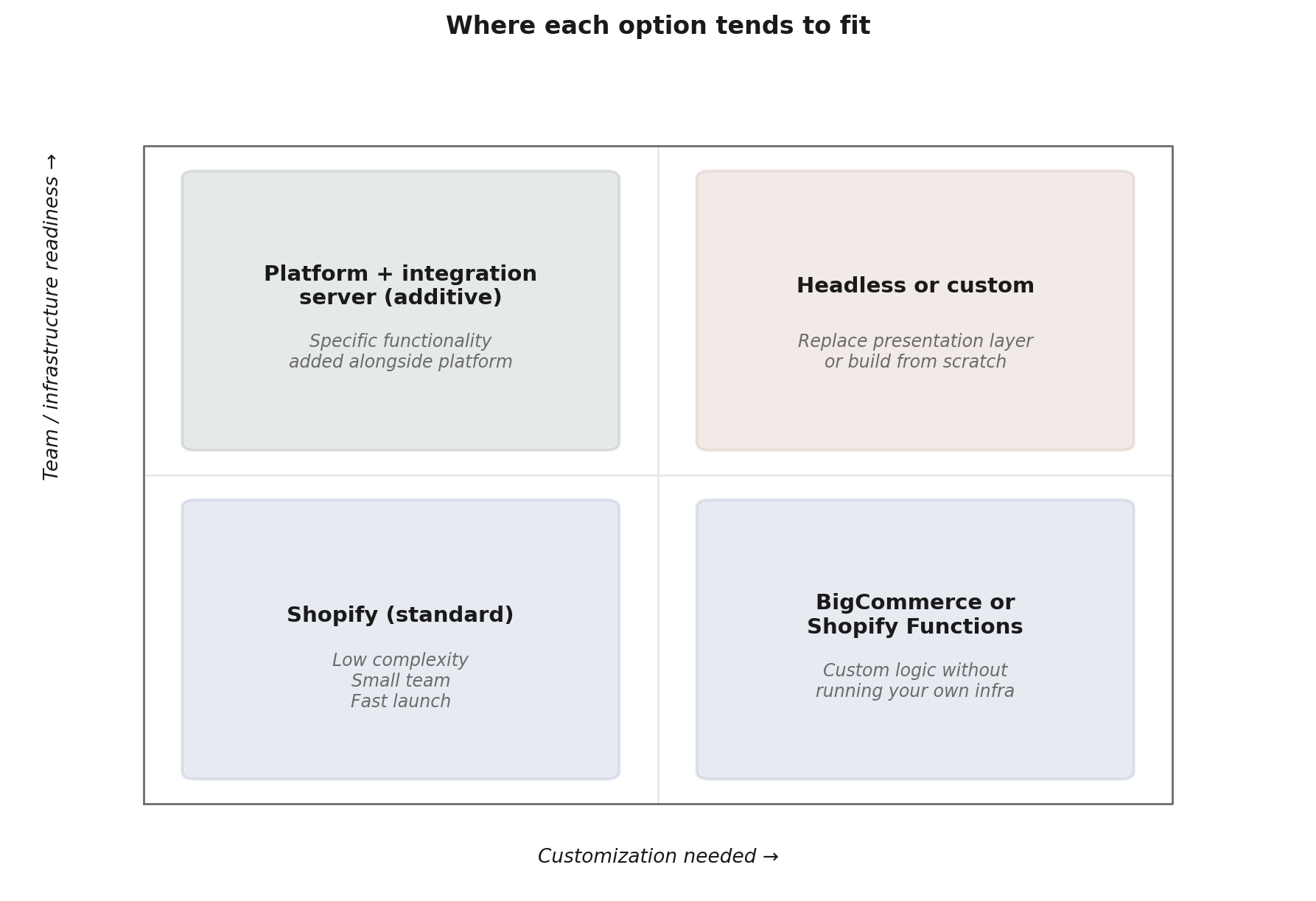 Where each option tends to fit based on customization needs and team readiness.
When custom is the right call
Custom commerce — meaning building catalog, cart, checkout, payments, and fulfillment from scratch — is the right answer in far fewer cases than people assume. Custom is reinventing the wheel. The major platforms have spent over a decade building commerce primitives, including security hardening, fraud detection, payment integration, and the testing that comes with all of it. Whatever you’d build is going to be less mature than what they already provide.
Feature parity isn’t a finish line. It’s a moving target, and the platforms are moving toward it faster than you can.
The platforms aren’t waiting for your custom build to catch up. They ship commerce features continuously, so by the time your build approaches the feature set they have today, they’re years further ahead. I’ve seen teams spend years and significant money on custom commerce only to launch and go down within weeks, because the build itself became the liability. The result almost never justifies the cost.
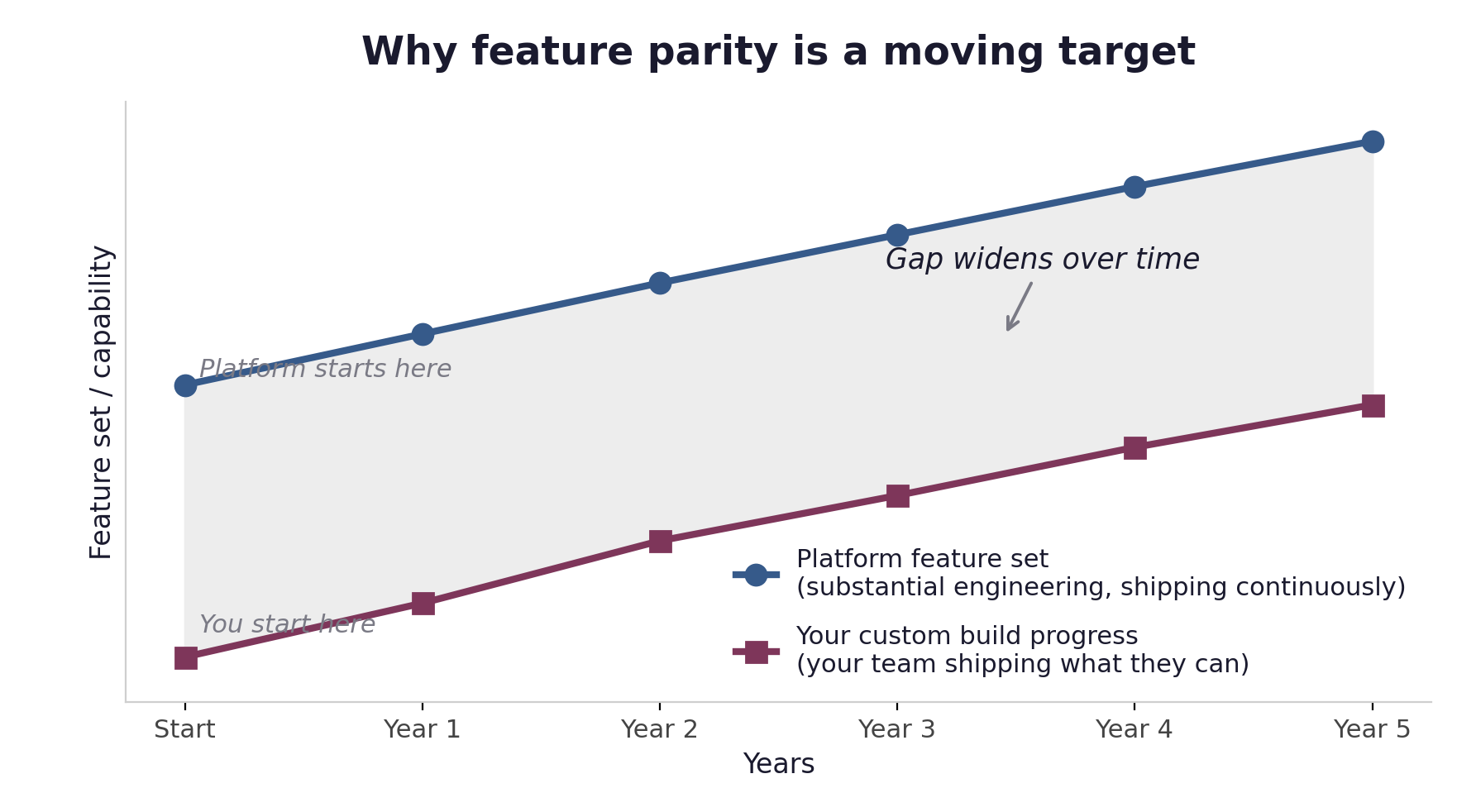 Custom builds start at zero and ramp slowly. Platforms start with a mature feature set and continue shipping. The gap widens over time, not narrows.
Worth being precise about terminology here: open source commerce platforms aren’t what I mean by custom. Magento Open Source, WooCommerce, and similar self-hosted platforms are a middle path. The commerce primitives are already built and battle-tested; you own the deployment, customization, and ongoing operational work. That’s a different category from building catalog, cart, checkout, and payments from scratch. The cautionary framing about custom applies to from-scratch builds, not to self-hosted platforms.
Custom is the right call in two narrow situations:
Compliance or data residency requirements the platforms can’t satisfy. Regulations that require data to be stored in jurisdictions neither platform serves, or industries with highly regulated infrastructure requirements that can’t be met on platform infrastructure. Before going fully custom, look at self-hosted alternatives. Magento Open Source lets you own the code and deploy it in any region with whatever compliance controls you need. Custom from scratch makes sense only when even self-hosted commerce platforms can’t meet the requirements.
You’re building a commerce platform as your product. If your SaaS product is commerce infrastructure (you’re building what Shopify or BigCommerce are, not building a store on them), custom is by definition the answer. You’re not choosing a platform to power a business. You’re competing with the platforms.
That’s the list. Custom requires hiring engineers to maintain commerce infrastructure indefinitely. You’re on-call for payment processing, fraud detection, order management, and fulfillment integration, work that isn’t your differentiator and isn’t your core business.
The headless question
Headless deserves its own treatment because it’s the architectural decision teams agonize over most, and the one most often chosen for the wrong reasons. The architectural section above introduced both variants (headless frontend, composable commerce). This section addresses when each is the right call, what they actually cost, and the operational realities most evaluations miss.
Both platforms have built infrastructure to support headless patterns. Shopify offers Hydrogen (a React framework) paired with Oxygen, a hosting platform included with all paid Shopify plans from Basic upward (Starter plans and development stores are excluded). BigCommerce offers Catalyst, a Next.js-based framework. The platforms aren’t fighting headless anymore. They’re competing to be your headless infrastructure provider.
Why enterprises choose composable commerce specifically
For large stores, composable commerce isn’t a more expensive version of frontend-only headless. It’s a different architectural decision with different goals. At enterprise scale, the platform becomes one system among many. ERP, OMS, PIM, CDP, search, personalization, and a dozen other systems all need to participate in commerce. A custom backend layer becomes the canonical commerce service for the business, with the platform as one upstream provider that backend consumes.
The scalability characteristics differ meaningfully from the frontend-only pattern. Platform APIs have rate limits, caching constraints, and performance characteristics that match their hosted architecture. When you have a backend layer in front of them, you can cache aggressively, implement custom rate limiting strategies, and serve the frontend from infrastructure tuned to your specific traffic patterns. For stores serving high concurrent traffic, this is part of what makes the architecture work at the scale they operate at.
The composable pattern also gives larger organizations independence from platform release cycles. When the platform ships a new feature, you decide when and how to integrate it into your backend layer. When the platform deprecates something, your backend layer absorbs the impact rather than forcing a coordinated frontend migration. This is similar operational independence to fully custom commerce, without the cost of reinventing the commerce primitives.
The honest read: for stores below a certain scale and complexity, composable commerce is overhead that doesn’t earn its place. For large enterprises with substantial integration needs, high concurrent traffic, or strict performance requirements, it’s not overhead. It’s the architecture that lets the business operate independently of platform constraints.
Why teams choose headless
The honest reasons headless is growing: frontend engineering talent (senior developers know React, not Liquid or Stencil); performance ceiling (well-built custom frontends can outperform themes on Core Web Vitals and SEO); custom user experiences themes can’t deliver cleanly; content stack flexibility for headless CMS integration; lower SEO risk if the commerce backend later changes, since the indexed frontend stays put while you repoint endpoints; and brand differentiation for DTC brands competing on experience.
The cost reality most evaluations miss
Going headless doesn’t reduce what the platform provides — it duplicates it.
A platform subscription includes hosting, CDN, image optimization, caching, search, analytics hooks, and integration framework. When you go headless, you don’t stop paying for any of this. The subscription stays the same. But now you also need to recreate these capabilities on your own infrastructure: a hosting platform, a CDN, an image CDN, often a headless CMS, often a search service, customer data platform, error monitoring, A/B testing tools.
For most of these, the platform’s standard theme provides equivalent functionality natively. You’re not adding capabilities. You’re replicating them on your own stack while still paying for the platform’s version. If you go with the backend variant, the duplication compounds. Your backend layer needs its own hosting, monitoring, scaling, and engineering ownership.
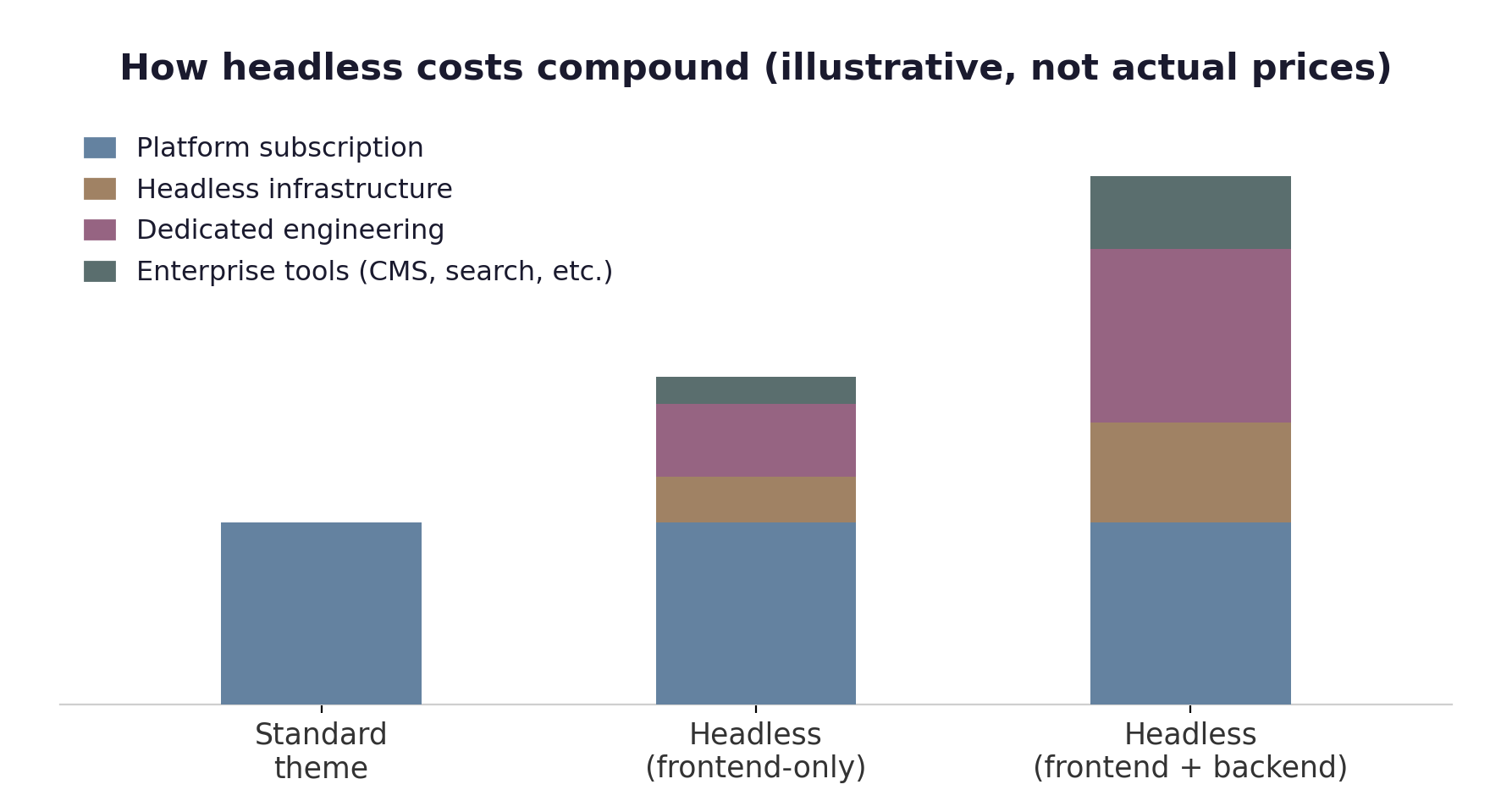 How total cost compounds across the two headless flavors. Platform fee stays the same; everything else stacks on top.
There’s another cost most evaluations miss: the platform’s app ecosystem becomes meaningfully harder to use on a headless storefront. On a standard theme, you install an app from the app store and it typically works out of the box, injecting scripts, hooking into checkout events, and integrating with the storefront automatically. On Hydrogen + Oxygen or Catalyst, many apps assume theme integration that doesn’t exist on your custom frontend. Admin-side apps (email automation, ERP sync, inventory tools) usually still work because they integrate at the API layer. Storefront-affecting apps (reviews, search, personalization, pop-ups, A/B testing, conversion tools) often require manual integration work for each one, and some simply don’t work in a headless context. The “install an app and it just works” benefit of the platforms is largely a benefit of the monolithic theme architecture. Going headless trades that benefit for frontend flexibility.
The engineering cost compounds with the infrastructure cost. A headless storefront needs ongoing engineering attention. When the platform ships new features, you integrate them into your custom frontend manually. Bug fixes, performance work, security patches all sit on your side now.
Headless deployment paths
The two platforms also differ in how you actually deploy a headless storefront, and the difference is itself a point of comparison.
On Shopify, the path is simple and uniform. Oxygen is included on every paid plan from Basic upward, and you deploy Hydrogen to it through the Shopify CLI. There’s effectively one blessed path, no plan-gated tiers to clear, and hosting is handled for you. Because Hydrogen is a standard React framework, you can also self-host it elsewhere if you want, but the default path works the same regardless of which plan you’re on.
BigCommerce’s Catalyst has more to weigh. One-Click Catalyst deploys to BigCommerce’s hosted infrastructure, which requires a plan tier that supports hosted multi-storefront, in practice the higher tiers such as Performance. This is narrower than the general multi-storefront availability noted earlier: the capability itself reaches lower plans, but One-Click’s hosted deployment specifically leans on the higher-tier version. Manual deployment via CLI or REST Management API works on any plan, but requires the team to host the storefront themselves on Vercel, Netlify, or their own infrastructure. For teams on lower plans, the manual path is the only option, which means they need engineering capacity to handle hosting and operations from day one.
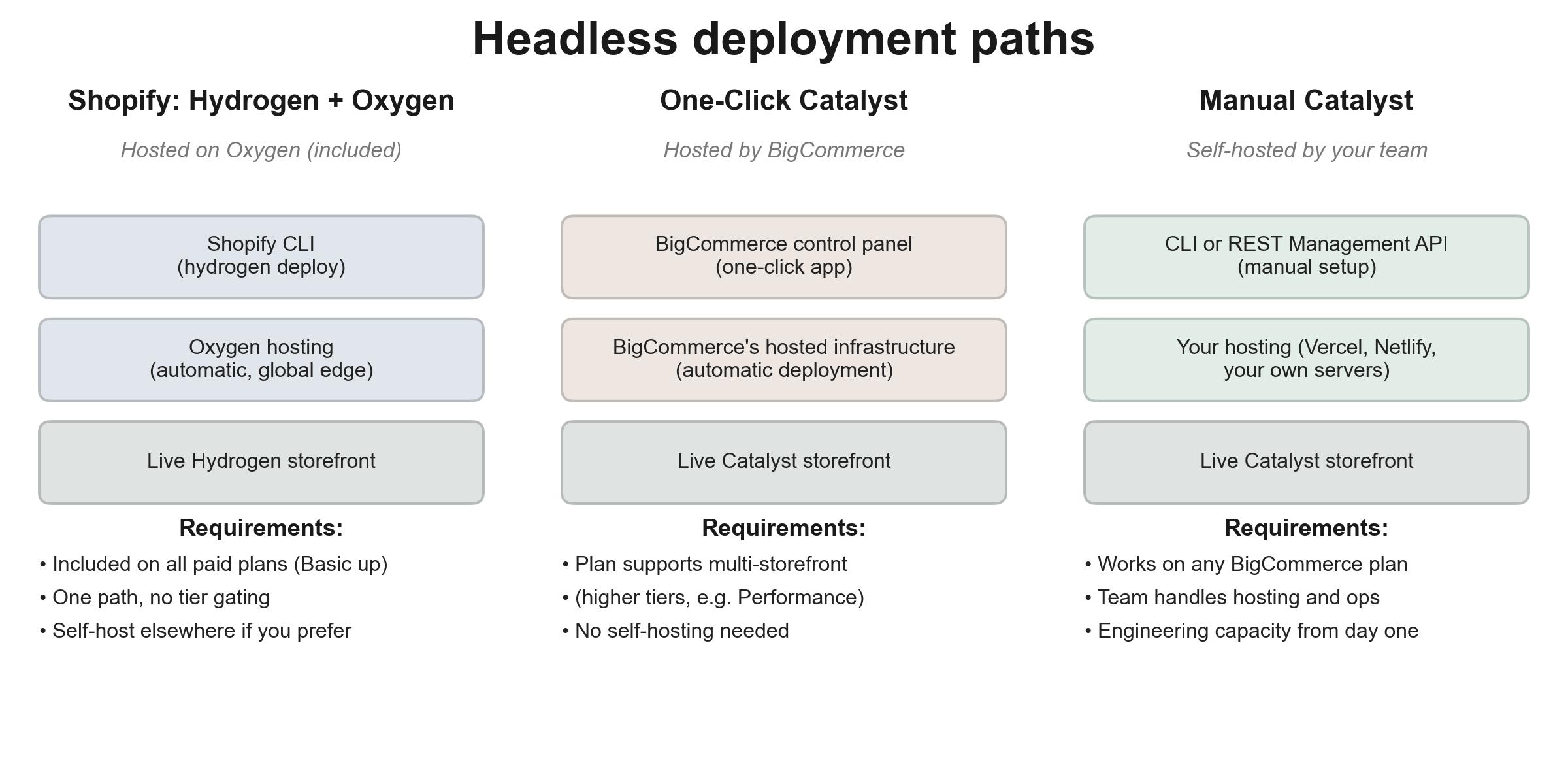 On the BigCommerce side, Catalyst has two deployment paths with different infrastructure and plan requirements. Shopify’s Oxygen, by contrast, is a single included path on every paid plan.
When headless makes sense, and when it doesn’t
Headless is right when brand experience is a primary differentiator that platform themes constrain, the team has strong frontend engineering capability, performance ceiling beyond themes is required, SEO is a primary traffic source and themes constrain what’s possible on the SEO surface (well-built headless can improve rankings and Core Web Vitals; poorly-built headless damages SEO), or the content stack genuinely needs the flexibility.
Headless also narrows the SEO risk of a future backend change. Because the frontend owns the URLs, rendered markup, structured data, and Core Web Vitals, swapping the commerce platform underneath (or moving to a composable backend) can leave the pages Google indexes essentially untouched while you repoint the data endpoints. This is a narrower, more accurate version of the “swap backends later” reasoning I caution against below: the backend migration is still real engineering work, but its blast radius on search equity is far smaller than a full theme replatform, where URLs and markup usually change at the same time. The protection only holds when the frontend genuinely stays put. If you rebuild the storefront at the same time, you’re back to a full replatform and the equity risk discussed in “The questions I ask” applies.
Composable commerce is the right call at enterprise scale where commerce sits within a complex operational environment, integration requirements are substantial, performance characteristics need to be independent of platform constraints, or release-cycle independence matters. These are narrower use cases than what frontend-only headless fits.
The common cases where headless is chosen for the wrong reasons: “headless is more modern” (modernity isn’t a business case); “we have React developers” (familiar tools aren’t a justification for architecture); “we want flexibility” (flexibility without specific requirements is just complexity); “we can swap backends later” (backend migration is still a significant project regardless of headless).
For most stores, a well-implemented platform theme outperforms a typical headless storefront.
The questions I ask
When teams ask “which platform should we use,” I can’t answer without working through specific questions. These are really business-clarity questions disguised as technical ones.
Is this a replatforming or a new store? Replatforming takes significantly more energy, particularly around preserving URL structures, SEO equity, customer accounts, order history, and integrations built up over years. The same recommendation can land differently depending on which situation you’re in.
If you’re replatforming, the SEO person belongs in the discovery conversation, not the post-decision implementation phase. A store with established search traffic has equity that’s harder to preserve than to build, and what’s preservable depends on platform-level decisions made before any code is written. Bringing SEO in late means adapting to constraints that could have been part of the decision.
I’ve also seen what replatforming actually costs, both in direct refactor work and the time it takes to get right. But the cost has to be weighed against what staying on the wrong platform is costing: engineers afraid to touch the system, daily operational pain from divergence between platform capability and business goals, accumulated technical debt from years of workarounds, or outdated platforms generating constant issues. Replatforming is expensive. So is staying on a platform that’s wrong for you. The honest evaluation compares both costs, not just the visible one.
Walk me through how the current store works. A layman walkthrough, not a technical deep-dive. Just the user-facing experience and the operational flows behind it. This surfaces what the team actually uses, what’s been customized, what’s been bolted on, and what’s effectively dead but still in place.
What does your store look like in 5 years? Catalog size, revenue range, geographic reach, product mix, channel mix. The platform needs to fit where the business is going, not just where it is.
What do you service: B2C, B2B, B2B2C, marketplace? And specifically: what’s the expected order volume? These determine traffic patterns, transaction volume, customer account complexity, and which platform features actually matter.
Do you have a team for maintenance? Not the build team. The team that will keep this running after launch. Internal engineering, external agency, hybrid, or none? The answer affects which platform makes sense and which architectural patterns are realistic.
What happens if your store is offline for an hour? This calibrates everything else. A store losing $500 in that hour has different requirements than one losing $50,000. Uptime tolerance, monitoring requirements, and how much infrastructure complexity is justified all depend on what downtime actually costs.
Do you have capacity to operate additional infrastructure? Capacity in both team and finance. A team that already runs production systems with proper on-call rotation can carry headless or integration servers. A team without that capability can’t, regardless of what the finance side allows.
What third-party systems are you using or planning to use? ERP, OMS, PIM, CRM, marketing automation, customer service, accounting, tax, shipping. Each platform integrates with these differently, sometimes native, sometimes via app, sometimes requiring custom work. Integration availability often shapes the platform choice more than core commerce features do.
What does your traffic actually look like? If possible, real data from Google Analytics or Search Console: pageviews, peak periods, traffic sources, geographic distribution. The “we’re growing” answer is different from “here’s what the data shows.”
Not all of these questions carry equal weight — in practice, three drive most of the decision: “What happens if your store is offline for an hour” (calibrates everything), “Do you have capacity to operate additional infrastructure” (determines architecture options), and “Is this a replatforming or a new store” (sets the constraint structure). The others refine the answer. If you only have time for three, those three carry the most signal.
Common mistakes I see
Going custom. The instinct to build from scratch when extending a platform would solve the actual need. The reasoning sounds like “we need control” or “our business is unique,” but the specific control rarely justifies the years of work, and the uniqueness usually fits within what platforms support or can be extended to support.
Not investing time in the platform choice. Teams pick a platform quickly, often based on what’s familiar, and then spend years trying to make it work for use cases it wasn’t designed for. Choosing badly then forcing fit costs far more than choosing carefully.
Choosing based on outdated comparison content. Most platform comparisons in search results are years out of date. Picking based on what was true in 2020 rather than what’s true now leads to decisions that don’t reflect current realities.
Replatforming for a small issue an integration server could fix. When the actual problem is a specific gap, the cheaper answer is usually an integration server that handles that gap while leaving everything else intact.
Ignoring SEO during replatforming evaluation. Replatforming without SEO involvement from day one risks the search equity the store has built up over years. By the time the gaps surface during migration, the cost of addressing them is much higher than it would have been earlier.
Going headless because it sounds modern. The modernity of an architecture isn’t a business case. Headless is right when specific benefits outweigh the substantial cost; it’s wrong when chosen because the team wants to use it.
Treating platform choice as a one-time decision. The platform is going to evolve. Your business is going to evolve. Building the decision around current-state fit, without considering where the platform is investing and where your business is heading, sets up future replatforming risk.
Honest takeaway
Three things if you take nothing else from this:
Invest time in shopping for the platform instead of choosing one. The time comes back tenfold. Working through what each platform actually does, how it fits your specific business, and where it’s heading is genuinely cheaper than picking quickly and then spending years adapting.
Stay away from custom unless you fall into the narrow cases. Compliance the platforms can’t satisfy, or you’re building a commerce platform as your product. That’s it. Every other “we need custom” conversation is almost certainly an integration server or headless conversation in disguise.
For small and medium stores, treat headless as a last resort. Platform themes have evolved significantly. Most stores at this scale don’t have requirements that themes genuinely can’t meet. They have a team that prefers React, or a sense that headless sounds more sophisticated. Neither is a business case. If you genuinely need headless, make sure you have the engineering capability and operational readiness to maintain it long-term. Without that, the architecture becomes a liability regardless of how it’s hosted.
A note before you commit
Platform decisions look simple from the outside and compound for years on the inside. The choice shapes what’s easy, what’s hard, and what’s possible across the next several years of the business, long after the original team that made the decision has moved on.
The platforms have done the work of building commerce. The work that remains is choosing the right one for your specific business, then doing the things that actually differentiate it. Everything else is plumbing.
Whichever way you go, choose carefully. The cost of choosing well is a few extra weeks of evaluation. The cost of choosing badly is years of fighting the platform.
If you'd like a second set of eyes on a platform decision, or you're evaluating a replatforming and want to talk it through, we work with teams on both at Ojixa. Get in touch.